SimLab: Local WebAssembly Optimization with Industrial-Grade Browser Solvers
The Simulations4All Team
SimLab bundles five production optimization solvers compiled to WebAssembly. The optimization solvers listed on this page execute their displayed models locally via WebAssembly. That scoped statement does not cover server-only or accelerated functions, sharing, feedback, or analytics. Offline use is not guaranteed. Already-loaded cached local features may continue without a connection, but opening or reloading SimLab, uncached assets, server computation, sharing, feedback, and analytics can require the network. If you came here looking to run .m files online that call linprog, quadprog, or fmincon — they work, with MATLAB®-compatible signatures. This post covers what you can solve today, how the stack is put together, an honest look at WASM benchmark numbers, and a worked portfolio-optimization example you can paste into SimLab right now.
What you can solve today
SimLab's optimization module exposes MATLAB-compatible entry points backed by five industrial-grade solver libraries. Each one has a long production pedigree outside the browser — we've compiled them to WASM without compromising the solver internals.
| Entry point | Solves | Backend |
|---|---|---|
linprog | Linear programs (min c'x s.t. Ax ≤ b) | FUSE LP (Rust) |
intlinprog | Mixed-integer LPs | HiGHS |
quadprog | Convex QPs (default path) | Clarabel |
quadprog_piqp | Convex QPs (interior-point, warm-start friendly) | PIQP |
coneprog / socp | Second-order cone and SDP programs | Clarabel + SCS |
fmincon | Constrained nonlinear minimization | NLopt (SLSQP / COBYLA / MMA) |
fminunc | Unconstrained nonlinear minimization | NLopt (L-BFGS, Newton) |
fminsearch | Derivative-free minimization | NLopt (Nelder-Mead) |
ga / sl_de / sl_pso | Population-based global search | NLopt + native GA/DE/PSO |
fzero | Root finding, scalar equations | NLopt bracketing |
fsolve | Nonlinear systems | Levenberg-Marquardt via NLopt |
lsqcurvefit | Nonlinear least squares / curve fitting | NLopt |
Every entry point above accepts the same argument pattern your textbooks and class notes already use. If your MATLAB code calls linprog(f, A, b, Aeq, beq, lb, ub), SimLab accepts exactly that signature and returns [x, fval, exitflag, output] in the same order. That's the design rule: drop-in alternative for common toolbox functions, not a clean-room rewrite of the API.
The five-solver stack
The reason we shipped five distinct solver libraries — rather than one general-purpose optimizer — is that each problem class has a best-in-class open-source solver, and you should not have to change tools mid-problem. Here's the stack:
- FUSE LP — a Rust dual-simplex and barrier IPM solver we wrote in-house, compiled to a 1.3 MB WASM module with SIMD128. Dual-licensed AGPL-3.0+ / commercial. Powers
linprog. This is the hot path for continuous LPs. - HiGHS — the open-source MIT-licensed LP/MIP solver used by research groups worldwide. Powers
intlinprogand acts as a reference for LP correctness checks. - Clarabel — Apache-2.0 conic solver (Rust, from Stanford). Handles convex QPs, SOCPs, and semidefinite programs under one interior-point method. The default
quadprogbackend and the workhorse forconeprog. - SCS — MIT-licensed operator-splitting conic solver (Stanford) for large first-order problems that benefit from splitting methods.
- PIQP — BSD-2 proximal interior-point QP solver (ETH Zurich). Exposed as
quadprog_piqpfor problems where warm-starting between similar QPs matters — MPC loops, sequential quadratic programming, iterative risk-parity. - NLopt — LGPL-2.1+, with 30 nonlinear algorithms (L-BFGS, SLSQP, COBYLA, MMA, Nelder-Mead, BOBYQA, DIRECT, CRS, ISRES, StoGO, and more). Powers
fmincon,fminunc,fminsearch,fzero,fsolve,lsqcurvefit. - WebGPU fallbacks — for users with browsers that support GPU compute, we ship PDHG for LP, ADMM for QP, plus parallel differential evolution and particle swarm optimizers. These are secondary paths; the default remains WASM so that the whole stack works on every modern browser including Safari's WASM-only mode.
The optimization solvers listed on this page execute their displayed models locally via WebAssembly. That scoped statement does not cover server-only or accelerated functions, sharing, feedback, or analytics. Offline use is not guaranteed. Already-loaded cached local features may continue without a connection, but opening or reloading SimLab, uncached assets, server computation, sharing, feedback, and analytics can require the network.
Why local solvers matter
Server-backed optimization is the default posture on the web today. You upload your model to someone's API, pay per solve or wait for cold-start containers to spin up, and wait for the result to come back. That works until it doesn't. When you're building a workflow around repeated solves — parameter sweeps, Monte Carlo, sensitivity analysis, real-time control — the network round-trip becomes the bottleneck. Locally, the same LP that took 300 milliseconds of solver time turns into 800 milliseconds of wall time the moment you route it through a cloud API. Multiply that by a thousand problem instances and the difference is lunch. Four places where server-backed optimization breaks down in practice:
- Travel and remote sites. Field engineers solving pipeline sizing on an offshore rig, researchers on a trans-Pacific flight, students commuting on underground transit. If your optimizer depends on a signal, you lose work.
- No-signup tutorials. "Create an account" kills the tutorial momentum. An instructor wants to share an optimization homework link; the student opens it and solves. Any friction step is a point of churn.
- Educator grading labs. Graders marking hundreds of student submissions at a kitchen table with spotty internet need a runtime that doesn't time out when the router hiccups.
- Data-privacy-sensitive problems. Portfolio weights, supply-chain constraints, and clinical trial designs are often confidential. A browser-local solver sends nothing to a server — your objective coefficients never leave the tab.
This is why we compiled full-strength solvers to WebAssembly instead of making every displayed optimization solve a remote API call. The optimization solvers listed on this page execute their displayed models locally via WebAssembly. That scoped statement does not cover server-only or accelerated functions, sharing, feedback, or analytics. The browser workspace requires no MATLAB® license or installation. Connected features require network access and may have account, tier, availability, or usage limits.
The classes of problems this unlocks
A few workflows that go from painful to trivial when the solver is local:
- Parameter sweeps in coursework and research. A student exploring how a production schedule changes as demand varies can re-solve an LP a thousand times in a
forloop. On a remote API that's an afternoon; on FUSE WASM it's under a minute for any problem under 500 variables. - Real-time portfolio rebalancing in the browser. Compute mean-variance weights, efficient frontiers, and Sharpe-maximizing portfolios in interactive dashboards with no backend at all. This is what makes online portfolio optimization feasible as a static page.
- Educator-built interactive textbooks. Embed a live
linprogorfminconcall behind a slider and let students see how the optimum shifts as parameters move. - Operations research demos for job interviews and sales calls. Share a URL, the other side opens it, the solver runs on their laptop. No DevOps involved.
A worked example: portfolio optimization
Here is the classic mean-variance portfolio problem, exactly as you'd write it in MATLAB, pasted into SimLab without modification:
% Mean-variance portfolio: minimize risk subject to target return.
% Five-asset toy example — paste into SimLab and hit Run.

mu    = [0.12; 0.10; 0.07; 0.03; 0.15];        % expected returns
Sigma = [0.08  0.02  0.01  0.00  0.03;
         0.02  0.09  0.02  0.00  0.02;
         0.01  0.02  0.04  0.01  0.01;
         0.00  0.00  0.01  0.01  0.00;
         0.03  0.02  0.01  0.00  0.12];

n   = length(mu);
r   = 0.10;                                    % target return
H   = 2 * Sigma;                               % quadprog uses (1/2) x' H x
f   = zeros(n, 1);
Aeq = [ones(1, n);  mu'];
beq = [1; r];
lb  = zeros(n, 1);                             % long-only
ub  = ones(n, 1);

[w, fval] = quadprog(H, f, [], [], Aeq, beq, lb, ub);

fprintf('Portfolio weights:\n');
disp(w);
fprintf('Portfolio variance: %.4f\n', fval);
fprintf('Expected return:    %.4f\n', mu' * w);
That's it — no optimset dance, no licensing prompt, no API key. The call flows through SimLab's quadprog shim into the Clarabel WASM module, which returns an optimal solution within single-digit milliseconds for this size. Swap quadprog for quadprog_piqp if you want warm-start-friendly behavior when you re-solve for a new target return. If instead you want to sweep the target return to trace out the efficient frontier, wrap the call in a loop:
returns = linspace(0.05, 0.15, 41);
risks   = zeros(size(returns));
for k = 1:length(returns)
    beq(2) = returns(k);
    [~, fval] = quadprog(H, f, [], [], Aeq, beq, lb, ub);
    risks(k) = sqrt(fval);
end
plot(risks, returns);
xlabel('Portfolio standard deviation');
ylabel('Expected return');
title('Efficient frontier');
Forty-one QPs, each with a different equality constraint, solved locally in the time it takes the plot to render. That is the kind of responsiveness you lose the moment you push solves out to a remote API.
Benchmark honesty — WASM numbers only
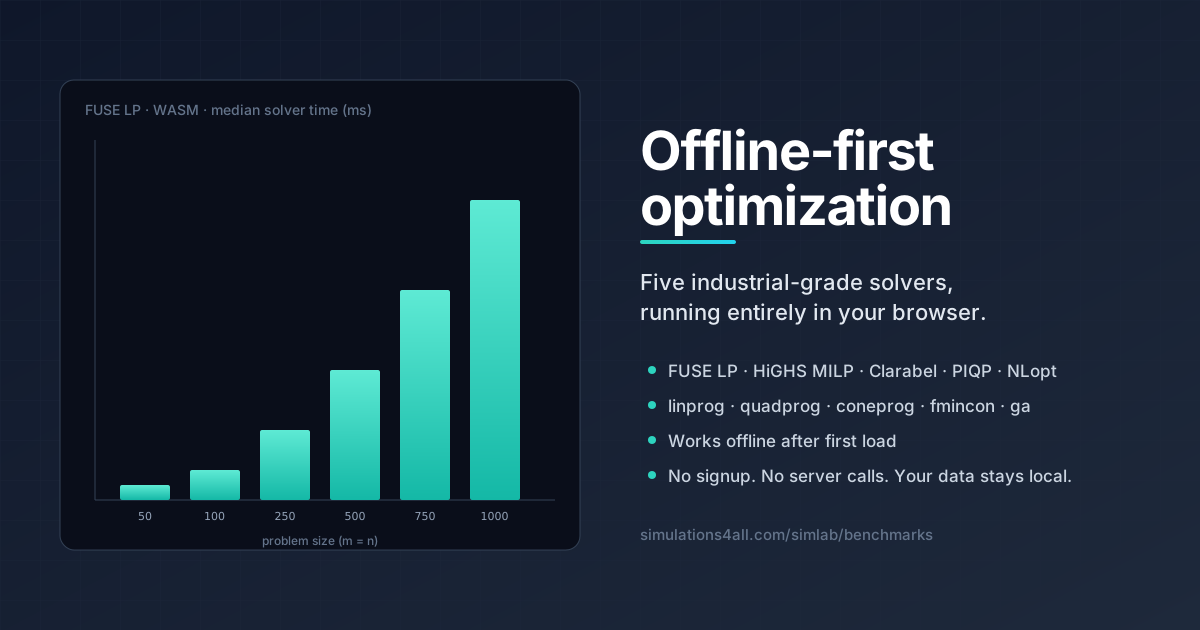
We care about shipping numbers you can reproduce. The table below is drawn directly from our 2026-04-12 LP benchmark suite, showing FUSE LP compiled to WebAssembly on 30% dense random feasible LPs. These are the numbers that matter for a browser product. (Our native Rust build is faster — that's a different story for a different post.)
| Size (m × n) | Nonzeros | Median solver time (ms) | WASM overhead vs native |
|---|---|---|---|
| 50 × 50 | 780 | 0.490 | 3.66× |
| 100 × 100 | 3,005 | 1.65 | 2.39× |
| 250 × 250 | 18,818 | 24.66 | 1.63× |
| 500 × 500 | 74,928 | 230.1 | 1.85× |
| 750 × 750 | 168,809 | 958.4 | 2.11× |
| 1000 × 1000 | 299,438 | 2,682.0 | 2.42× |
| 1500 × 1500 | 673,934 | 12,979.8 | 2.89× |
| 2000 × 2000 | 1,200,397 | 41,867.9 | 3.54× |
Two honest framings:
- WASM overhead sits in the 1.6×–3.5× band. That is the expected cost of running dense linear algebra through a WebAssembly runtime rather than a native CPU build. It is not a solver quality penalty — the algorithm, the sparse LU factorization, and the pivoting rules are identical. Only the compile target differs.
- Objective agreement is the correctness claim that matters. Across every one of the LP instances above, FUSE WASM's optimal value matched the reference solver to within 1e-4 relative tolerance, and in most cells to within 1e-7. A fast wrong answer is not useful; a correct answer in the 100-millisecond range on a 500-variable LP in a browser tab is genuinely useful.
To our knowledge, FUSE WASM is the fastest in-browser Rust-authored LP solver we are aware of. That is a modest class claim — the population of serious WASM LP solvers is small — but it's an honest one, and it's the one you should expect from a product team that doesn't wave around inflated "Nx faster than X" headlines.
If you want to re-run these cells yourself, the interactive runner at simulations4all.com/simlab/benchmark executes the same problem generator in your own browser. Numbers will vary with your CPU.
Migrating from local .m files
The migration story is: open SimLab, paste. Named functions match. Argument order matches. Return shape matches. For the common optimization toolbox functions we're discussing today — linprog, intlinprog, quadprog, fmincon, fminunc, fminsearch, ga, fzero, fsolve, lsqcurvefit — you should not need to rewrite anything. If you find a call that breaks, our compatibility tracker is the place to file it.
A few practical notes from early users migrating coursework:
- Anonymous handles just work.
fmincon(@(x) x(1)^2 + x(2)^2, x0, ...)parses and evaluates correctly. optimsetoptions flow through.Display,MaxIter,TolFun,TolX, andAlgorithmmap to the underlying NLopt / Clarabel knobs.- Mixed-integer calls prefer the new
intlinprogsignature. The olderbintprogstill works as a shim. - SDP goes through
coneprog. If your code uses CVX, we have a CVX-style mini-parser on the way; for now write the primal directly.
What's next
Everything above ships today. The roadmap for our native solver path over the coming months focuses on advanced branch-and-cut features for our commercial native binary: Gomory cuts, knapsack cover cuts, feasibility pump and relaxation-induced neighborhood search (RINS) heuristics, strong branching, pseudocost branching, and a Bayesian solver-parameter tuner. Those features live on the commercial native solver path and are not part of the WASM bundle in SimLab — they are the work that makes the native build a serious competitor to commercial solvers outside the browser.
For SimLab WASM, the near-term improvements are aimed at browser LP QP SOCP NLP responsiveness: smaller bundle size via feature flags (only ship the solvers a given page actually uses), persistent caching of factorizations across re-solves, a WebGPU-first path for very-large sparse QPs, and tighter .m compatibility for the long tail of toolbox corner cases. We are also working on a CVX-style modeling mini-language so that conic problems can be written in their natural primal form instead of standard matrix-vector notation.
How we think about "industrial-grade" vs "commercial-grade"
We are deliberate about the word we pick. Every solver bundled in SimLab is an industrial-grade codebase: HiGHS, NLopt, Clarabel, and PIQP all ship in production research and engineering pipelines outside the browser. FUSE LP is our own work with 17 documented solver-quality optimizations plus a barrier IPM fallback. Calling these industrial-grade is accurate and verifiable.
What we do not say is that FUSE WASM is "commercial-grade" or "Gurobi-class" on raw throughput. Commercial solvers like Gurobi, CPLEX, and Mosek represent decades of engineering investment with all-cores parallelism, heavy symbolic preprocessing, and extensive tuning across MIPLIB instance libraries. Our native build has started to close that gap on specific problem classes — that is a story for a separate post about the native commercial path. In the browser, the honest framing is: correct answers, open-source-solver-competitive quality, with the convenience that only a WebAssembly runtime can offer.
Try it
Open SimLab, paste a .m file that uses linprog or quadprog, and hit Run. Or head to the benchmark landing page for the quick-reference tour, or the interactive runner to time your browser against ours. The browser workspace requires no MATLAB® license or installation. Connected features require network access and may have account, tier, availability, or usage limits. SimLab is not a blanket local-only service. Eligible server computation sends the selected function name and arguments; user-invoked sharing and feedback send the content you choose; session and event analytics send bounded metadata.
MATLAB® is a registered trademark of The MathWorks, Inc. SimLab is an independent project from Simulations4All and is not affiliated with, endorsed by, or sponsored by The MathWorks, Inc.
Try It Yourself
Explore our collection of interactive simulations and professional tools — free in your browser.
Explore Simulations