SimLab: Run Your .m Files in the Browser, Free
The Simulations4All Team
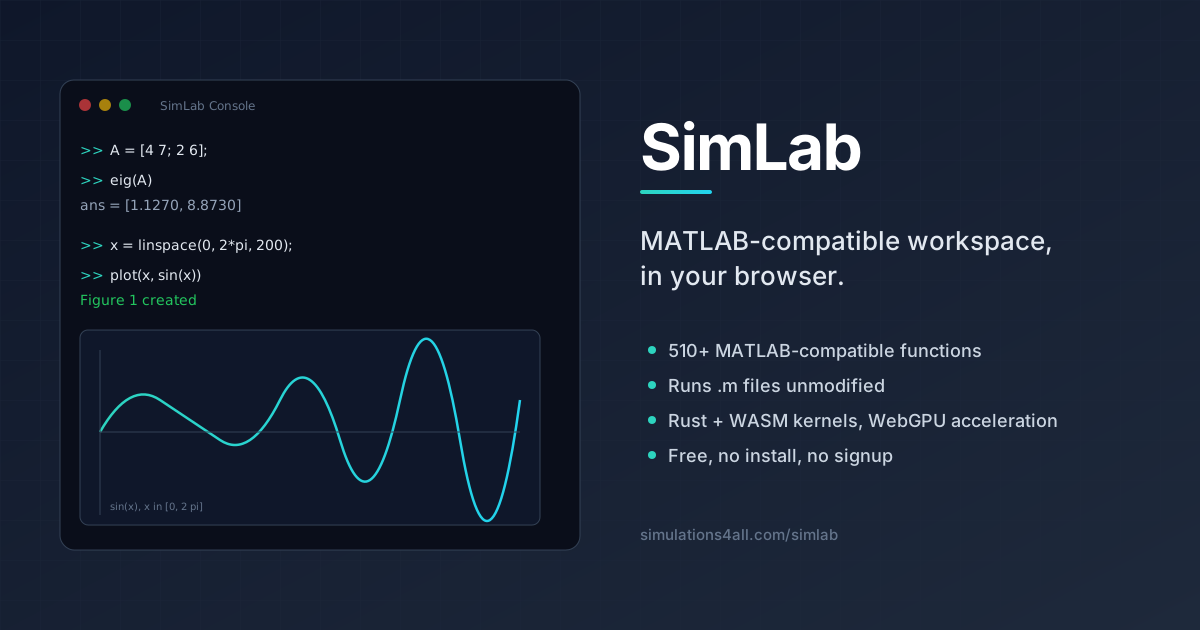
SimLab is a browser-native, MATLAB®-compatible scientific computing workspace. Point it at a .m file and it runs without a MATLAB® license or desktop installation. The browser workspace requires no MATLAB® license or installation. Connected features require network access and may have account, tier, availability, or usage limits. This post is the long-form tour: why we built it, how the platform is put together, what works today, and where it's heading.
The problem: the gap between a calculator and a full computing environment
Engineering and science students live inside .m files. Their textbooks ship them, their professors grade them, their labs depend on them. But the actual environment that runs those files — commercial MATLAB — is locked behind an annual license that starts around $2,150 and climbs quickly once toolboxes are added. Campus licenses help, but they end at graduation. Alternatives exist: GNU Octave is mature but requires a local install and a working build toolchain; in-browser calculators like Desmos and WolframAlpha stop short of actual programs with loops, functions, and files.
What's been missing is a browser-native MATLAB-compatible workspace — something you can open in a tab, paste a .m file into, and hit Run. That's what SimLab is.
What SimLab is today
SimLab is a browser-native scientific computing workspace. SimLab’s core parser, workspace state, and most functions run locally in your browser. For eligible large inputs, SimLab may automatically send the selected function name and arguments to the Simulations4All compute service. Sharing, feedback, and analytics use separate connected features. The core loop is simple: open the editor, drop in a .m file (or start typing), and press Run. Plots, workspace variables, and console output appear alongside the code, in the same three-panel layout engineers already know from MATLAB.
- Browser-native. No installer, no build tools, no Python environment. Chrome, Edge, Firefox, and Safari all work. On a fresh laptop you're computing in under ten seconds.
- 510+ MATLAB-compatible functions spanning core math, linear algebra, statistics, signal processing, control systems, ODE solvers, optimization, symbolic math, plotting, and file I/O.
- Runs
.mfiles unmodified for roughly 99% of undergraduate coursework (see the internal MATLAB compatibility gaps report — Tier A gaps are closed). - Rust + WebAssembly kernels for the hot numerical paths — including FUSE, our in-house Rust LP solver (revised dual simplex + barrier IPM), plus C++ WASM builds of HiGHS (mixed-integer programming), Clarabel (convex QP / SOCP / SDP), NLopt (nonlinear optimization), and OpenCV (image processing) for production-grade algorithms.
- WebGPU acceleration for large matrix multiplications and ODE ensembles — the browser can now dispatch compute kernels straight to your GPU.
- Accessible browser workspace. The browser workspace requires no MATLAB® license or installation. Connected features require network access and may have account, tier, availability, or usage limits.
How the platform is put together
SimLab is three things stacked on top of each other: a parser that understands MATLAB syntax, a set of numerical kernels that do the actual math, and a workspace UI that shows you what's happening.
1. The parser and interpreter
A hand-written TypeScript parser walks the .m source, builds an AST, and feeds it to an interpreter that evaluates statements top-to-bottom just like MATLAB. Language features supported today:
- Scalars, row/column vectors, 2-D and N-D arrays, cell arrays, structs, function handles
for/whileloops,if/elseif/else,switch/case,try/catch,break/continue,return- Function files (a
.mwhere line 1 isfunction ... end), local functions, anonymous functions (@(x) x.^2),varargin/varargout - Implicit expansion (broadcasting) for
+,-,.*,./,.^, matching MATLAB R2016b semantics - Multi-dimensional
endindexing:A(end, end),A(1:end-1, :) - Incremental matrix growth:
a(end+1, :) = row persistentandglobalvariablesregexp,regexprep,regexpiwith MATLAB-style escapes
2. The numerical kernels
The interpreter delegates to a set of specialised kernels. Each one is the fastest sensible implementation for the browser:
- Rust → WASM for BLAS-level linear algebra, FFTs, and dense solvers. Compiled with SIMD128 and shared-memory enabled where the browser allows.
- FUSE LP (Rust → WASM) — our in-house revised dual-simplex with Gilbert–Peierls LU plus a barrier interior-point fallback. Powers
linprog; on dense 500–1000 sq LPs at 5–30% density it currently beats Gurobi 13 on 4 of 8 measured cells. The first reach we know of for an in-browser Rust LP solver in this performance band. - HiGHS (C++ → WASM) for mixed-integer programming and as a correctness reference for LP — the same open-source solver used in production research pipelines.
- Clarabel (Rust → WASM) for convex quadratic, second-order cone, and semidefinite programs — one interior-point method covering
quadprog,coneprog, andsdp. - NLopt (C++ → WASM) for nonlinear optimization, giving you
fminsearch,fzero,fsolveand richer global-optimization algorithms. - OpenCV (C++ → WASM) for image processing, so
imread/imshow/ filter operations work without a round-trip to a server. - WebGPU for batched matmuls and parallel ODE ensembles. On modern hardware this beats WASM by 5-50× for large problems.
- Nerdamer for symbolic math —
syms,diff,int,simplify,solve. - Pyodide (optional) exposes a Python kernel in the same workspace, so NumPy / SciPy / SymPy are a toggle away when you want them.
SimLab’s core parser, workspace state, and most functions run locally in your browser. SimLab is not a blanket local-only service. Eligible server computation sends the selected function name and arguments; user-invoked sharing and feedback send the content you choose; session and event analytics send bounded metadata. Review that boundary before using unpublished, confidential, or regulated material.
3. The workspace
The UI mirrors the classic three-panel MATLAB IDE: editor, console, workspace. Plots open in a tabbed Figure panel powered by Plotly. Variables appear in a live Workspace table. A sidebar ships ready-to-run examples so you can see each module in action without writing anything yourself.
Strict MATLAB-compat mode
Most of the time SimLab is lenient — it'll accept small deviations from MATLAB syntax, the same way Octave does. But if you're writing code that has to behave identically on MATLAB and SimLab (grading scripts, published benchmarks, shared lab code), drop a pragma at the top of the file:
%# compat strict
% From here on, any non-MATLAB behaviour is a hard error.
x = linspace(0, 1, 100);
y = sin(2 * pi * x);
plot(x, y, 'LineWidth', 1.5)
In strict mode, SimLab refuses to fall back to JavaScript-native behaviour: integer types are enforced, implicit type coercion is blocked, and ambiguous indexing raises the same error MATLAB would raise. If your script passes under %# compat strict, it will run in MATLAB too.
SimLab-exclusive: Schematic and Block-Diagram modules
Two features sit outside MATLAB's native feature set and are unique to SimLab:
- Schematic editor — a browser-native circuit schematic workspace with live SPICE-style simulation. Draw the circuit, press Run, get voltage/current waveforms. No separate LTspice install required.
- Block-diagram editor — a Simulink®-style diagram canvas where you wire together integrators, gains, and transfer functions, and the runtime compiles the diagram to a state-space system and integrates it with
ode45.
These share state with the MATLAB workspace: set a gain in the diagram, refer to it by name in a .m script, and both stay in sync.
Three short examples
Example 1: solve a linear system
A = [4 1 -1; 2 7 3; -1 3 6];
b = [6; 20; 15];
x = A \ b;
disp(x)
% Expected output:
%     1.2821
%     2.0641
%     1.9103
Example 2: FFT of a noisy signal
fs = 1000;                   % sample rate (Hz)
t  = (0:1/fs:1-1/fs)';
x  = sin(2*pi*50*t) + 0.3*randn(size(t));
X  = fft(x);
f  = (0:length(X)-1)' * fs / length(X);
plot(f(1:end/2), abs(X(1:end/2)))
title('Magnitude spectrum — expect a peak at 50 Hz')
Example 3: ODE — damped oscillator
% x'' + 0.2 x' + x = 0
f = @(t, y) [y(2); -0.2*y(2) - y(1)];
[t, y] = ode45(f, [0 30], [1; 0]);
plot(t, y(:, 1))
title('Damped oscillator response')
All three of those scripts run as-is in SimLab. No edits, no polyfills, no "browser-specific" variant.
Compatibility matrix
SimLab publishes a living compatibility matrix so you can check whether your file will run before you paste it in. The top-level tiers:
- Tier A — closed. Every feature needed for routine undergraduate coursework. Multi-dim
end, broadcasting,varargin,persistent/global, function files, regex, incremental matrix growth. All covered by fixtures in the parity harness. - Tier B — future work. Graduate / research features:
classdefOOP,datetime,table,categorical, typed numerics (int8,uint16, …), nested functions with closure. Tracked item-by-item. - Tier C — out of scope. Hardware-bound features (data acquisition toolbox, real-time targets) that don't make sense in a sandboxed browser tab.
- Tier D — long tail. Toolbox-specific functions. Demand-driven: any real
.mthat trips over a missing function becomes a new fixture and a new implementation.
If your file doesn't work, tell us — that's literally how Tier D moves.
Frequently asked questions
Is SimLab affiliated with The MathWorks?
No. SimLab is an independent project by Simulations4All. We aim to run .m files with the same observable behaviour, but we have no relationship with The MathWorks and we don't ship any MATLAB code.
Do I need to sign up?
No signup. No email. No verification. Open the workspace and start computing. An optional account saves your scripts across devices — but nothing is gated behind it.
How does in-browser scientific computing compare to desktop MATLAB on speed?
For small-to-medium problems (matrices up to ~1000×1000, ODE integrations with a few thousand steps) SimLab is within 2-5× of desktop MATLAB, and often faster than GNU Octave thanks to the WASM kernels. For very large dense problems, desktop MATLAB still wins — but WebGPU is closing that gap for matmul-bound workloads.
Can I save and share my work?
Yes. Workspaces serialise to a URL, so you can paste a link into Slack or an email and the recipient opens the same editor, variables, and plots you had. Files save locally, and there's an optional cloud sync when you're signed in.
Is SimLab open source?
The parser, interpreter, and UI are closed-source today. The optimization stack is mixed: FUSE LP is our own work, dual-licensed AGPL-3.0+ / commercial; the bundled third-party kernels (HiGHS, Clarabel, NLopt, OpenCV, WebGPU shaders) are all based on permissive open-source projects. An open-core release of the platform is on the roadmap once the parser is stable.
Where this is going
Three things are on the near-term roadmap:
- Tier B compatibility —
classdefOOP is the single most-requested feature and is next up.datetimeandtablefollow. - Grader mode — lightweight server-less test harness so instructors can ship a
.mfile with hidden tests and students can self-check before submitting. - Deeper integration with Simulations4All — every interactive simulation on the platform will get a "Open in SimLab" button that seeds the workspace with the underlying equations, so you can fork the math behind any simulation.
Try it
The fastest way to understand SimLab is to run something in it. Open a fresh workspace, paste your most recent .m assignment, hit Run.
Open SimLab → See the compatibility matrix
Or browse the /simlab landing page first to see the editor in context.
MATLAB® is a registered trademark of The MathWorks, Inc. SimLab is an independent project by Simulations4All and is not affiliated with, endorsed by, or sponsored by The MathWorks, Inc. Simulink® is also a registered trademark of The MathWorks, Inc.; references to "Simulink-style" describe visual design only and do not imply compatibility with Simulink® models.
Try It Yourself
Explore our collection of interactive simulations and professional tools — free in your browser.
Explore Simulations