Open Tools · Rowfettle
Rowfettle user guide
Learn Rowfettle: load CSV or JSON, inspect findings and histograms, review near-duplicates, preview remedies and export a cleaned copy. To use the tool itself, open Rowfettle.
Professional use. Results are for education and preliminary design. They must be checked by a qualified professional, and they are not a substitute for code-compliant design or licensed engineering judgement.
Work through a synthetic dataset before inspecting your own file. Rowfettle keeps the original unchanged, explains each flag and makes every repair an explicit choice. This tool is a screening aid; interpretation requires knowledge of the source.
Reuse rules and inspect missingness patterns
After Analyze, open Reusable rules and missingness patterns. The editor has two views of the same document: Form (one row per check, with the column names of your file suggested as you type) and JSON. The first check requires the first column. Add checks for presence, numeric range, allowed values, text length, pattern or mask, declared type, a comparison between two columns, date order, sums, uniqueness and lookups, plus whole-table checks on row count, column order, missing share and distinct count. Patterns run on a bounded matcher with no executable code. The form also declares columns and keys (a declared column expands into its own checks).
Use Export rules JSON (always Suite v2), then Import rules JSON on another file and Run rules. Import also accepts a version-1 rule set, which keeps running through the version-1 engine unchanged, and the supported subset of Table Schema, CSVW metadata and expectation-suite files; anything in such a file the tool cannot evaluate is listed as not checked immediately after import and again in the results, and a not-checked item never counts as a pass. A malformed file shows an error and changes nothing. Export Table Schema (subset) refuses when the suite holds checks that format cannot express rather than exporting a weaker contract. Columns that are not in the analysed file refuse the run.
The pass rereads every source row, even when profiling uses streaming sketches. Every row check reports passed, failed and skipped counts, and the results say how many rows were checked so that passed + failed + skipped always equals that number; whole-table checks show the observed value. Missing operands skip a comparison unless the check says otherwise, while a required check fails missing cells. Invalid present dates/numbers fail. Failure examples are at most eight one-based data rows, each a button that shows the exact source row in the data map; tick Also download every failing row as JSON Lines before running to receive every failing row number with the positions of the checks it failed, counted from 0 in the exported result.rules array (the on-screen row-check number minus one; whole-table checks are excluded). Multiline CSV records can span physical lines.
The Missingness pattern matrix covers the first 16 columns in the displayed order. Each bit is 1 for missing and 0 for present. The first 32 distinct patterns retain exact counts; other patterns accumulate in Other rows. These counts describe joint absence under your missing tokens, without claiming a missing-data mechanism or displaying a sampled count as a census.
Export the validation as JSON or Markdown. The SHA-256 covers the stated validation payload, including rules, missing tokens, parser format/delimiter and results; a Suite v2 report also carries the digest of the suite that produced it. A Suite v2 digest is computed over canonical JSON (sorted keys, ordered arrays, exact decimal numbers), the report states that scope in words, and the Markdown export embeds the complete payload, so a reader without this tool can extract the payload, canonicalise it and recompute the same digest. It does not hash source bytes, establish authenticity or prove two source files are identical. Keep the original source and application revision separately. Editing rules invalidates the displayed report; changed analysis settings require Analyze again. No rules or source cells are saved automatically. Reports can reveal column names and failing row numbers, so review before sharing.
Start here: a complete first review
Choose Survey: missing values and spelling in Synthetic examples. Its records are invented and contain no personal information. Press Analyze, wait for Analysis complete, and read the tier label before interpreting results.
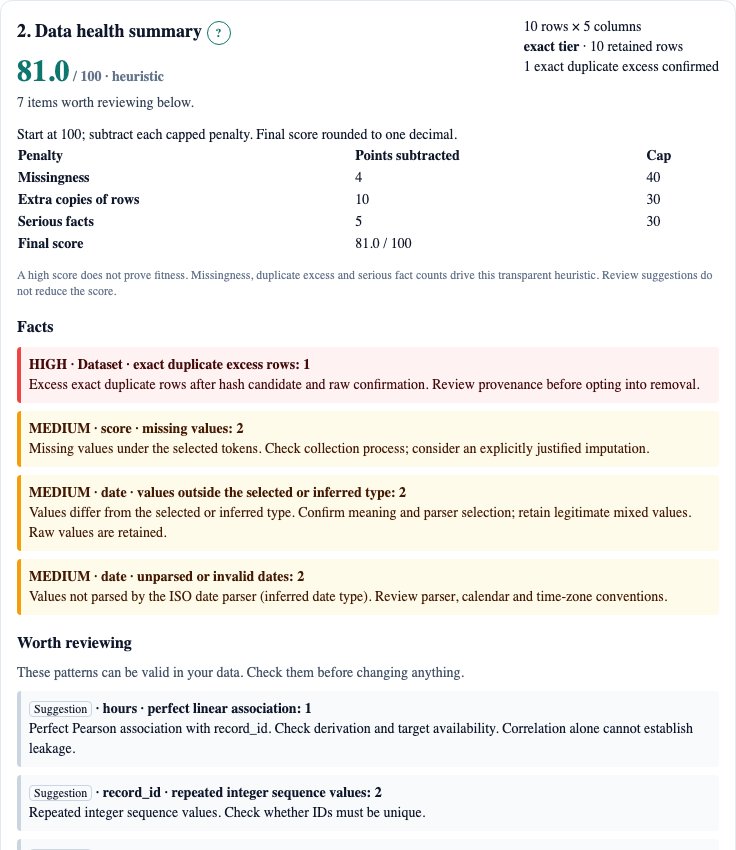
The survey contains 10 rows and 2 missing cells. Its score column has mean 26.25, and the dataset contains 1 excess exact duplicate row. These are observations of this fixture, not typical values for surveys. Select score in Column, examine the histogram, then inspect label and its normalised spelling candidates.
Use the four first-run tips to follow load → health summary → column/map review → deliberate repair. Every question-mark link opens the corresponding section of this tutorial. Clear dataset releases the current file and result from this page; browser history and downloaded exports remain under your control.
!Rowfettle synthetic survey health summary with missing-cell and duplicate findings
Load CSV, TSV, JSON arrays or JSON Lines
CSV: choose a local .csv file, leave Format on auto, and Analyze. Quoted commas, doubled quotes, UTF-8 text, CRLF and newlines inside quoted cells are supported. Headers must be unique and nonempty. Empty physical lines are skipped; a quoted empty cell is a missing observation. No input is silently truncated.
TSV: choose .tsv or select tsv. Tabs inside quoted fields are preserved. For semicolon, pipe, colon, caret or tilde tables, automatic delimiter detection compares separators in the header and their consistency across records, outside quotes. Timestamp punctuation cannot outvote a separator absent from the header. Inspect the resulting columns. For any other single-character separator, enter it in Delimiter; the explicit override takes precedence. Fixed-width tables and multicharacter delimiters are unsupported.
JSON array: select json for an array of objects. A nested object is flattened one level: a reading object with a value property becomes reading.value. Arrays inside cells and deeper objects are refused. The first object defines the schema; later objects can omit fields (missing), but cannot introduce new fields. Rename colliding flattened keys before import. JSON duplicate keys follow JSON.parse and keep the last value: resolve them upstream.
JSON Lines: choose .jsonl/.ndjson or select jsonl. Object records are framed incrementally; whitespace between records is accepted. The same flattening and schema rules apply. Ambiguous slash dates remain text. ISO timestamps require an explicit zone to identify an instant.
Spreadsheet files: native .xlsx reading is deferred. No compatible maintained spreadsheet parser is installed, and a partial ZIP/XML reader would create incomplete format guarantees. Save the intended sheet as UTF-8 CSV; check formulas, dates, leading-zero identifiers and the selected sheet before analysis. No package is downloaded by the tool.
Choose a domain preset and an explicit schema
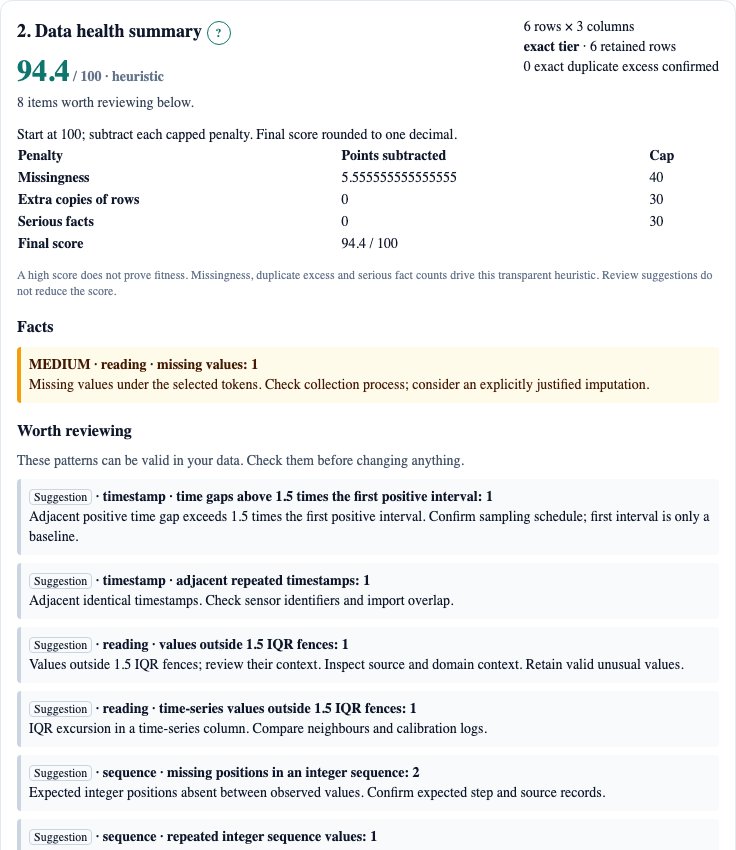
Generic checks apply in every preset. Survey/forms keeps the generic missingness, distinct values, representation, relationship and spelling checks, with no invented survey constraints. Sensor/time-series additionally reports adjacent equal readings, repeated/decreasing timestamps, IQR spikes and gaps relative to the first positive adjacent interval. Financial/transactions adds exact duplicate transaction records, negative values in amount/price/balance/total columns, round-number excess and an eligible first-digit discrepancy. Lab/measurement reports mixed unit suffixes and detection-limit strings. Inventory/IDs checks safe-integer gaps and repeats against Expected integer sequence step; check digits are not implemented.
The sensor example has 6 rows: 1 clock-gap interval, 1 adjacent repeated timestamp, and 2 flat-line transitions in reading. The transaction example has 6 rows, 1 excess duplicate, 1 negative amount and 1 missing amount. The Entry review example has 20 rows and 2 absent integer positions in sequence. A gap is evidence of an absent expected value, not proof a person skipped entry.
!Rowfettle sensor health summary with timestamp-gap and repeated-timestamp suggestions
Missing tokens are case-insensitive after trimming. Blank, NA, N/A, null, none and NaN are defaults. Replace the comma-separated list to fit your collection process; keep an empty item to treat blanks as missing. A token such as NA could be a real category, so agree its meaning first.
Column type inference uses the numeric or ISO-date fraction of present values. A column needs at least 80% numeric/date values for that type. Select a column and override auto with number, text or date, then Analyze again. Text preserves numeric-looking IDs and prevents numeric statistics from changing their meaning. Overrides apply to this session and are not persisted with dataset column names.
Read facts and review suggestions
The summary begins with row count, column count, exact/streaming tier and duplicate coverage. Facts are counts under the stated settings, exact duplicate rows or parser results. They retain severity colours. Inferred patterns appear under Worth reviewing with a neutral Suggestion label. These patterns can be valid in your data. Check them before changing anything. Each finding supplies its count, definition and next action. “Estimated/sample” identifies incomplete or sample-based evidence.
The score is a transparent triage heuristic: start at 100; subtract missing-cell percentage capped at 40, exact duplicate excess percentage capped at 30, and five points per serious fact capped at 30; review suggestions contribute no penalty. It is not a probability, certification or comparison across domains. A high score does not establish suitability for your use. A valid repeated-measures dataset can receive duplicate warnings.
The screen separates facts from review suggestions, each with an expandable remainder. Export report contains the full list and all coverage notes. Print summary provides the health view; large results, browser paper size and margins can require multiple pages. Review column details before choosing any remedy.
Understand each finding family
Missing values: denominator is all rows for column fractions. More than 40% missing generates a Do not use without review warning. Missingness patterns cannot establish whether data is missing at random. Inspect the collection process and the consequence of excluding records.
Few distinct/constant/type mismatch: a constant numeric column has equal finite extrema; exact text constancy uses all present raw values. Two to five distinct values among at least twenty present values raise a few-distinct hint. Numeric/date overrides expose present values that do not parse. Streaming distinct counts are estimates, so borderline category counts need confirmation. Text variants preserve raw strings; leading zeros may encode identity.
Outlier/spike: values outside Q1−1.5 IQR and Q3+1.5 IQR are flagged, requiring four retained numeric observations. The fences include their endpoints. A valid unusual observation stays valid even if flagged. The v1 numerical engine and independent tests also retain sample-z and robust-MAD rules; the current Open Tool interface displays IQR excursions. Skewness is not a diagnosis of data corruption.
Dates: invalid ISO-shaped dates or a failed date override are flagged. Decreases and duplicates refer to adjacent valid observations; missing or invalid values break adjacency. Clock-gap baseline is the first positive interval, with a gap above 1.5 times that interval; changing schedules can therefore create legitimate warnings.
Sequences: safe integers are sorted and deduplicated; intervals divisible by the expected step contribute interval/step−1 absent positions. Other intervals are off-grid. Repeats count additional observations of the same integer. Streaming keeps a byte-bounded run-length integer set. Its gaps/repeats are exact until the set saturates; after saturation, the displayed sequence result uses retained rows and can miss observed IDs. Read the estimated label.
Entry/row shift: a consecutive duplicate equals the immediately previous raw tuple. For at least three columns, row-shift evidence means all overlapping cells equal the previous tuple shifted exactly one position left or right. The tool cannot reconstruct human actions or determine whether rows were skipped.
Finance: negative amounts can be legitimate refunds. More than half of numeric observations being exact multiples of ten is a round-number hint. Benford compares first positive significant digits with log10(1+1/d), needs at least one hundred positive values spanning two orders of magnitude, excludes ID/code/key headers, and uses an illustrative discrepancy threshold. Assigned prices, bounded values and IDs can be unsuitable; no fraud conclusion or calibrated p-value is supplied.
Lab: strings such as 10mg and 0.02g produce mixed-unit evidence; they remain text until correctly converted. A value such as <0.5 is censored evidence, not a measured zero. No automatic unit conversion or detection-limit substitution occurs.
Spelling, exact/normalised/fuzzy rows and column relationships have distinct definitions in the next sections. Every detector asks for source review; no flag automatically changes the data.
Read histograms, category bars, ranges and log scales
Select a column. Numeric histograms divide its observed numeric range into ten equal-width bins; the maximum goes into the last bin. Constant observations occupy the first. Bin counts accompany the picture so colour is not the only signal. Non-numeric columns show the most frequent raw categories; streaming top counts include their SpaceSaving error.
Enter finite View minimum/maximum and press Apply view to focus on a range. These controls change the chart, not the analytical summaries or file. Values outside that range are omitted from the view. Enable Log scale only for positive bounds; bins then have equal width in log10 coordinates, which can reveal multiplicative ranges. Do not use a log axis to conceal zeros or negative observations.
Teal bars represent original observations; amber bars show a remedy preview on the original linear min/max bin range. The preview reports observations moved outside the original range separately. Reset the custom view to compare that overlay. Default streaming histograms and quartiles use weighted KLL sketches and are labelled estimates; custom range/log views use retained rows. The caption changes only after Apply view completes. A picture that looks smooth is not evidence of a particular probability distribution.
Read the colour map and drill down to exact source rows
Each band groups records by their byte position in the source, preserving file order. Teal means present; orange intensity represents missing fraction; purple marks an IQR excursion when missingness does not have colour priority. Missingness bands use the entire stream in both tiers. Streaming outlier marks use retained observations and cannot show every excursion.
The map shows twenty columns at a time to keep the full visual readable on a phone. Previous/Next columns changes that window; the local slot numbers map to actual column names and source indices in the key. Click a band, or use the keyboard: Tab to the map, arrow keys move the focus band, Home and End jump to the first and last band, Enter or Space shows that band’s first ten rows; the Band list under the map offers the same choice. Or enter First row, then Seek 10 rows. Row numbers are one-based data records, excluding the header, not physical text lines: quoted newlines can occupy several lines.
The worker seeks from a sparse UTF-8 byte-offset index and reads only the needed following records. Drill-down shows exact original values, including whitespace and missing tokens. It does not fetch anything from a server. The result table may scroll; charts fit their containers.
Type inference, column profile and missingness patterns
Column detail shows the inferred type with its confidence as a fraction: the number of present values that parsed as that type over all present values, followed by the alternatives considered and, for numbers, the decimal and grouping grammar. Override as … writes the matching type override; like any override it takes effect after Analyze. Values with leading zeros are flagged as identifiers because a number override would not preserve them. When an engine build provides no inference evidence, the panel says so instead of showing a guess.
Column profile and missingness patterns lists quantiles, moments, counts, text lengths and the date range for the selected column. Every number is shown with the count it is based on: rows for present and missing, present values for zeros, negatives, whitespace and lengths, numeric values for quantiles and moments, distinct present values for case-variant groups. Moments are labelled with their basis (population moments) and read Unavailable below three or four observations or at zero spread.
When the engine advertises matrix support, choose up to 64 columns and press Compute missingness matrix. Each heatmap row is one pattern of joint absence (orange = missing, teal = present, grey = mixed) and its label shows the rows in that pattern out of all rows. Tab to the heatmap, then arrow keys move between cells, Home and End jump within a row, Page Up and Page Down move five patterns; the focused cell is described in the text under the heatmap and in the cell tooltip. Below 480 px the matrix is a list; Show as list offers the same text at any width. The reconciliation line checks that pattern rows plus other rows equal all rows. The phi coefficients and conditional means describe association between absences; they do not establish why values are missing. When an engine build does not compute the matrix, the panel says so instead of showing a result.
Correlations, duplicate columns and categorical mappings
Pearson uses pairwise-complete finite numeric observations, at least three pairs and positive spread. Online centred cross-products avoid subtracting two large raw sums. An absolute association within 1e−12 of one raises a leakage-review warning and reports the affine slope/intercept. This numerical convention is not a proof of symbolic identity. Information can be legitimate or unavailable at prediction time; only provenance resolves leakage.
Spearman applies the same correlation calculation to average ranks with ties. It can expose a monotonic nonlinear relationship that Pearson does not identify as perfect. Exact-tier ranks use complete retained observations; streaming ranks are estimated from the reservoir.
Raw column fingerprints nominate duplicate candidates, followed by cell equality confirmation. Normalised column candidates use the same value normalisation described below. Categorical functional dependency means each observed A value maps to one B value; one-to-one additionally requires the inverse mapping. High-cardinality unique identifiers can create a vacuous mapping and need interpretation.
Pair checks cover the first two hundred columns. Pearson uses pairwise-complete numeric observations in the first two hundred columns, including values first appearing late in the file. Streaming column equality and dependencies are sample-confirmed, so unsampled contradictions can be missed. The interactive message shows bounded relationship/finding lists and warning excerpts to protect responsiveness; export the full report for every retained finding. No automatic drop is based on correlation.
Separate exact, normalised and fuzzy candidates
Exact requires identical raw cell strings in every column, including formatting and missing tokens. Hash collisions never by themselves establish equality; raw values are confirmed. Duplicate excess counts additional copies beyond one representative.
Normalised applies Unicode NFKC, case folding, whitespace/punctuation/diacritic reduction, canonical finite numeric representation (including grouped thousands), and ISO dates/timestamps for the same instant. Normalisation can collapse meaningful punctuation or codes, so confirm context before merging.
Exact full-file check appears in section 5 for a streaming audit. Choose key columns (none are selected initially), then choose composite-key uniqueness, exact row duplicate excess, normalised row duplicate excess, or distinct values in each chosen column. Run exact check rereads the whole local file using temporary browser storage. Exact checks require an immutable source: the app uses the uploaded browser File snapshot. If its backing file changes and the browser can no longer read it, the check refuses; reopen the file and analyse it again. The storage note estimates offset records only; grouping needs additional space and the run may take a long time. Missing values participate as values. A normalised full-file count includes exact duplicates. Each completed count says Exact and shows its full row denominator. Cancelled, refused or changed-source checks produce no exact counts; reanalyse the original file or choose fewer counts to retry. Temporary files are removed on completion or cooperative cancellation; a cleanup failure is reported. The audit’s original estimates remain separate. After a check, Export report downloads text and canonical JSON with the check state and a version 3 health-report digest. Its source identity covers ordered parsed records and file metadata, not raw file bytes or authenticity. Choosing a new file clears the check.
Fuzzy values use deletion/trigram blocks, a length-scaled Damerau adjacent-transposition distance of at most two, and Jaro-Winkler similarity. Very short values permit at most one edit. A rare spelling must occur at most twice, while the proposed common value has at least three times its frequency. In streaming mode, conservative lower/upper count bounds enforce this ratio. Numeric comparisons use a disclosed sensitivity-dependent relative tolerance; zoned dates must identify the same instant.
Move Strict ↔ loose and release the slider (or use arrow keys) to recalculate counts in the worker. Looser sensitivity lowers the text similarity threshold and increases numeric tolerance; it cannot guarantee all near-duplicates. The tool searches at most five thousand categories and one hundred thousand comparisons per column; long strings use heuristic trigram blocking.
Fuzzy rows use MinHash-LSH blocks over normalised column tokens, followed by cell-by-cell similarity scoring. The current search uses at most five thousand retained rows, capped candidates and displayed matches. Short tuples may have no shared blocking token even when similar: absence of a candidate is not proof of uniqueness.
Check Accept on a spelling cluster to add its mapping to the export plan; unchecked means reject for that export. Inspect a row candidate, then explicitly choose whether to remove its second row. Changing sensitivity clears accepted cluster mappings to avoid applying a stale decision. Nothing merges during analysis.
Choose an imputation, exclusion or spelling repair
Choose a column and its Missing-value action. The default is none. An action affects only values matching the current missing-token list. Other values, including invalid numbers, are not silently coerced. Review accepted spelling mappings separately.
| Action | Behaviour | When to avoid it |
|---|---|---|
| Mean | Fill with full-stream numeric mean | Skewed data, categorical values, leakage-sensitive modelling, important variance |
| Median | Fill with exact or explicitly estimated median | When missingness carries information or subgroup structure matters |
| Mode | Most frequent raw present value; lexical tie break in exact tier | High-cardinality IDs, uncertain streaming top-frequency ordering |
| Constant | Your literal string | A constant that disguises unknown as observed zero |
| Forward | Last preceding original/merged present value | Unordered rows or changing processes; leading gaps remain missing |
| Backward | Next following original present value | Forecasting, where this leaks future information; trailing gaps remain missing |
| Linear | Row-position interpolation between original numeric anchors | Uneven sampling, categorical transitions, discontinuities; end gaps remain missing |
Backward fill and linear interpolation also work in streaming mode by seeking original anchors with bounded caches; this may reread parts of the source and can be slow. Linear interpolation is based on row positions, not timestamp spacing; time-series users should resample deliberately first. Streaming mean uses all numeric observations; median may be estimated. Mode uses full exact frequencies independently of the displayed top list. In streaming tier, mode is refused unless the global winner is certified from retained frequency bounds; excluded long categories prevent certification. Preview before exporting.
Column disposition flag retains the column and records Do not use in the change log. Drop excludes it from output. Warnings above the panel explain missingness, constancy or perfect-association concerns, but never force exclusion.
Opt into Drop excess exact duplicate rows only when a repeated tuple represents an unwanted copy. Streaming duplicate removal uses temporary hash/offset partitions with raw source confirmation. Without OPFS, a saturated cache falls back to exact prefix rereads; this can be slow, but never silently misses an unindexed duplicate. This check uses original raw tuples before other remedies. User-selected row removals also use original row indices. Output never reorders records.
Every choice in this section becomes a step in the recipe timeline (section 7). With a current engine build the section also offers text, number and date steps for the selected column: trim whitespace, lowercase or uppercase, replace one exact value, map several values, read numbers written with another decimal mark or grouping, rewrite dates as YYYY-MM-DD, rename the column in the export and set the missing tokens the export uses. A failed number or date parse leaves the cell unchanged.
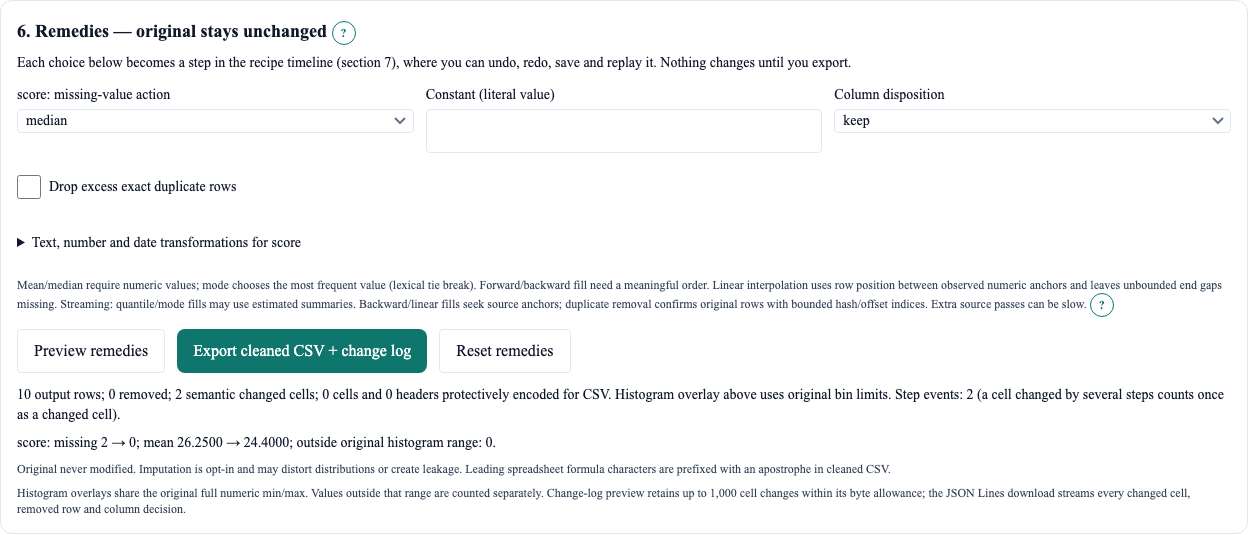
Press Preview remedies. Read output row count, removed rows, changed cells, selected-column mean/missingness and histogram overlay. Preview uses the same transformation as export. In streaming tier, Quick sample preview runs the same steps on the retained rows only and is labelled a sample; the export button stays disabled until a full preview has run. It does not overwrite the original or persist a plan. Reset remedies clears all chosen actions.
!Rowfettle remedy preview from the real synthetic survey, with the changed missing count
Undo, redo, save and replay a recipe
Section 7, Recipe timeline, lists every repair as an ordered step with its id, a plain-language description and whether it is active or undone. Undo removes the last step from the export and Redo puts it back; a new choice after an undo discards the undone steps. The keyboard does the same anywhere in the tool outside a text field: Ctrl or ⌘ + Z undoes, Ctrl or ⌘ + Shift + Z or Ctrl + Y redoes. Remove deletes one step from the timeline. After a preview, each active step shows how many of the listed changes it produced; that list is bounded, while the change log is exhaustive.
Export recipe JSON downloads the active steps as a Recipe v1 document with the column names it was built on; Import recipe JSON loads such a file with every step active. Steps whose column is not in the analysed file are named in red and refuse the run until removed.
Recipe steps are not stored automatically. Save recipe to this browser… opens a notice that says exactly what would be stored (step list, column names and every literal value you typed; never dataset rows) and saves only after you tick the box and press Save now. Saved recipes are listed with the time they were saved in Mountain Time; Load replaces the current steps after a second confirmation when steps exist, and Delete removes the entry.
Replay this recipe on another file reads a second local file in the worker, binds each step to its column by exact name and reports bound columns and unbound steps. Export replayed CSV + change log is offered only when every step is bound; the change log then starts with the recipe digest and the binding record. The second file never leaves this tab.
Find rows that may describe the same entity (record linkage)
Section 8, Record linkage, compares rows of the analysed file with each other. A match field names a column and a comparator (exact or normalised text, Soundex, Damerau-OSA edit distance, Jaro-Winkler, shared words, number or date tolerance) and a weight; a blocking rule (same exact value, same Soundex code, any shared word, same first characters, or a sorted neighbourhood window) decides which rows are compared at all. By default (Weighted average), the score of a pair is the weighted mean of its field similarities, from 0 to 1. It is a similarity, not a certainty that two rows are the same record. Pairs at or above the match threshold are matches; clusters join rows through chains of matches, so two rows in one cluster need not have been compared directly.
Choose How to score a pair → Count agreeing fields for a fixed agreement rule. Each present, unbounded field contributes one vote when it meets its comparator cutoff (or exact/tolerance predicate); weights are ignored. Missing values contribute zero and remain in the denominator. The score is votes divided by all configured fields; Required agreeing fields chooses k. The evaluation sweep steps through k from zero to the number of fields. Configuration JSON and linkage reports record the mode. Older configurations retain weighted averaging.
Accepts a pair when enough fields agree. Simple and predictable, but records that share common values can be matched wrongly. In development reliability QA with near-neighbour synthetic people, this mode reached only about 0.39 F1, as common names, dates and similar email strings produced false matches. Choose fields and inspect precision with known labels; more recall alone does not establish a better rule.
The result shows every count with its denominator: candidate pairs formed by blocking, comparisons made of the budgeted comparisons (at most 2,000,000 per run), pairs at or above the threshold of the pairs returned, and every block that exceeded the block cap with its rule, key and size — such blocks are skipped and said so, never silently truncated. On a streamed file the result is labelled “retained + exact-key”, which is not a census of the whole file.
Evaluation appears only when you choose a truth column, a column that holds the known entity id of each row. The truth column never takes part in scoring or blocking (the form refuses a config that uses it as a match field or a blocking key) and it is used only to compute blocking recall and precision, recall and F1 at 21 thresholds from 0.50 to 1.00 for weighted averaging (or each integer k for count mode), drawn as a chart with a sweep table and a threshold slider underneath. Each count is shown with its denominator (true pairs found of true pairs, predicted pairs, labelled rows of source rows). Without a truth column the panel says “Evaluation unavailable”. Agreement of the evaluation with an independent enumeration on a labelled public corpus is not yet measured.
Each candidate pair shows the two row numbers, its score and the agreement of every field; Inspect rows side by side reads both source rows through the worker. Keep row A, remove row B (and the cluster buttons) add a row-removal step to the recipe timeline in section 7; nothing is merged, and a row that an active step already removes is marked and is not offered again. The configuration can be exported and imported as JSON; the form names every refused field, rule or column.
Export a cleaned copy, change log and report
After a successful preview, Export cleaned CSV + change log. In Chromium with the Save File picker, output streams to the file you choose under backpressure; a failed/cancelled export aborts the writer. Without a native picker, output streams under the same backpressure to private temporary browser files (OPFS). When the files are ready, click Download cleaned CSV and Download change log separately. Canonical reports likewise have separate JSON and Markdown buttons. Keep this tab open until you have downloaded both files. Pending downloads cannot be restored after refresh; remove leftover temporary files and rerun the export. All pending in-memory exports share one admission allowance; download or remove older files before preparing more. “Download started” means the browser was asked to save that file; check browser downloads to confirm delivery. The disk-backed files are not gathered into memory. Temporary files contain output data and stay until both downloads have started (with a short handoff delay), you use Remove files, or leased recovery reclaims them after interruption. Short storage refuses with a reason. If leased OPFS is unavailable, CSV and history chunks together may use only four percent of the retained-state admission allowance; larger exports refuse.
Every CSV cell and header is quoted. Formula-leading characters (including Unicode compatibility equivalents and leading controls) receive an apostrophe to prevent spreadsheet formula execution. This deliberately changes their lexical representation, including negative numeric encodings in the exported spreadsheet-safe CSV. Inspect downstream parsing rules before using the copy as machine input.
The JSON Lines change log records the plan, every import header normalization, every semantic cell change, every protective-encoding cell/header change, every dropped row with original values, drop/flag column decisions, and final aggregate counts. CSV/TSV headers use header-trim-v1: original parsed header text is retained separately and trimming is logged before protective encoding, with zero-based source/canonical/output column indices (null output for a dropped column). Blank or duplicate canonical headers refuse; they are never silently deduplicated or renamed. A file-leading UTF-8 BOM is an encoding signature; BOM characters within quoted headers remain source text and any trimming is logged. JSON keys retain their original text. The csv-apostrophe-v1 serialization policy identifies protective events. Completion counts distinguish normalizedHeaders, semantic changedCells, protectiveCells and protectiveHeaders; quoting alone does not change parsed values. The on-screen preview is bounded separately. Retain both downloads and the original; a log without its final completion event is incomplete. Two Save File prompts choose the CSV and history destinations; cancellation before the operation starts leaves no completed export.
Export report downloads the complete retained findings and coverage notes as text when serialization fits its byte allowance. Dense relationships or long names can require more output space than the input: result admission or report export then refuses with a budget message. No truncated output is labelled complete. Increase the allowance or analyze fewer columns. Print summary invokes the browser print dialog; Save as PDF is available in Chromium. The print view keeps the health facts and review suggestions; larger results can span multiple pages. Use the text report for full evidence and coverage notes. Downloads contain dataset-derived information and should be handled according to your own access requirements.
Exact and streaming tiers: what estimated error means
The tool chooses exact tier when its initial file-size estimate fits the admission allowance derived from the memory envelope. Exact columns use Float64 numeric lanes, dictionary-encoded Uint32 raw values and missingness bitmaps. Parsing and analysis run in a worker; numeric sorting uses transferable buffers and a memory-bounded pool of hardwareConcurrency−1 workers. CSV framing remains sequential because arbitrary byte boundaries can split quoted records.
The Memory envelope control uses deviceMemory and performance.memory where available, with a default target and ceiling of 1.5 GiB. Your control can lower it. Retained analysis state is capped at the envelope divided by the admission factor (currently 2). The admission factor accounts for temporary parser, normalisation, fuzzy and serialization allocations. A memory-guard or allocation failure during exact analysis restarts the file in streaming tier and tells you. Admission counters do not measure heap usage or bound transient peaks. This is an admission policy, not a JavaScript hard heap limit. Total browser-process memory is not guaranteed; browser runtime, other workers, tabs and garbage collection still matter.
Streaming computes missing counts, Welford mean/sample variance, adjacent-entry checks and bounded Pearson cross-products over the full file. Each numeric column feeds a bounded KLL-style quantile compactor, separately from the row reservoir. Its weighted observations preserve the numeric count. Every compaction adds its input weight to a conservative, deterministic rank-discrepancy ledger. Divide this ledger by that column's numeric count to obtain the displayed rank error; sparse columns therefore have their own meaningful bounds. No confidence probability is invented. A median near a distribution gap can have a large error in value units despite a small rank error. Weighted histograms have at most twice the rank discrepancy as fixed-bin count error. MAD and fences also depend on estimated thresholds and have no simple numeric-value error guarantee.
The seeded row reservoir supports map excursions, Spearman and fuzzy inspection. Under long-cell pressure it may shrink; these exploratory outputs do not receive a random-sampling confidence claim. Every retained dictionary eviction releases its old string. Duplicate caches, frequent categories, integer runs, fuzzy blocks, parser messages and pair/rank workspace have separate byte allowances checked before allocation. Retained results have a sixteen-percent allowance of admitted state, view messages four percent, and complete report serialization four percent within the shared scratch/message reserve. In-memory download buffers have a combined four-percent allowance, leaving room for their Blob copies. These limits can refuse a result or export even when the source fits. Admission counters are not working-set measurements. Node pre-GC samples and directional Chromium worker-heap samples are separate evidence; neither guarantees a total browser-process memory ceiling.
Streaming HyperLogLog distinct estimates use a computed calibration coefficient: alpha for 1,024 registers is evaluated from its defining integral in the engine (engine/hll-calibration.ts) and checked against an independent reference. The optional settings field is an explicit override, recorded as such; leave it blank to use the computed value. The tool still makes no portable relative-standard-error claim. Exact distinct counts need no coefficient. SpaceSaving reports an upper frequency and an explicit error: true frequency lies between count−error and count.
Exact duplicate-row candidates can spill hashes and offsets to temporary OPFS partitions; candidate collisions seek and compare the original records. The external index admits a partition only when its bytes plus conservative metadata/collision workspace fit the duplicate allowance. Overfull partitions leave the count explicitly incomplete. Without OPFS, a full candidate cache turns duplicate counts into confirmed lower bounds. Where OPFS is available, normalised duplicate counts complete in a separate hash-only partition pass after the exact pass succeeds; without it they remain cache-bounded lower bounds. Temporary indices are removed on completion or cancellation. Interrupted operations are reclaimed before the next temporary index is opened; “Remove leftover temporary files” also removes unused files while preserving files owned by another tab. Browsers without Web Locks use the bounded memory fallback. Older temporary files without ownership leases require closing other tool tabs and clearing this site’s storage in browser settings. The largest file size at which these exact counts have been checked against planted truth in Chromium is not yet measured.
Progress identifies reading, statistics or duplicate-confirmation phases. Pause stops at the next chunk/job boundary; Resume continues. Cancel cooperatively stops the run and clears temporary handles. Do not close the tab while exporting. No offline/downloadable edition is provided: use the website for each review.
Privacy and saved settings
File contents are processed locally and are never sent to a server by the analysis code. The shared Open Tools gate may request a signed run token; that request is a GET whose query names the tool, it has no body and it never carries dataset records. Static site assets and standard site infrastructure still use network connections.
How this is checked, not asserted. A Chromium privacy matrix (the repository harness run with DIA_PRIVACY_MATRIX=1) drives the complete workflow — load, type inference, profile, the missingness matrix where the engine build advertises it (its receipt says "skipped" otherwise, never "done"), rules with every failing row exported, record linkage (bounded: a run that does not finish within the harness bound is cancelled and recorded as "skipped" with the bound), a recipe step with full preview, cleaned CSV and change-log export, replay on a second file, report export and Clear dataset — on every synthetic example and on a generated synthetic CSV (the harness default is 100 MB; each receipt records the size it ran), and records every network request the page or its workers make with its origin, method and body size. The receipt is accepted only with zero request-body bytes, zero non-GET requests and zero requests to another origin. Separately, a source gate parses every engine file with the TypeScript compiler and refuses any fetch, XMLHttpRequest, WebSocket, EventSource, sendBeacon or importScripts identifier, so a network call cannot be added to the engine without turning a test red. No installation is required: the tool is a page of this website.
Only an allowlisted settings object is saved through the shared Open Tools storage runtime: format, delimiter, preset, missing tokens, sensitivity, sample size and sequence step. The settings object excludes dataset contents, filenames, column-name overrides, findings, row selections and accepted repair mappings. Temporary exports can contain record data and repair history as described below. A recipe is stored only when you press Save now in the recipe timeline after reading what it stores; rules and suites are never stored. Browser-storage failures are displayed. Reloading requires you to choose the local file again.
Your data stays on this device; dataset contents are not uploaded. Settings are saved in this browser; a recipe is saved only when you ask for it. Exports, including large exports, may use the browser’s private temporary storage for cleaned records and change history. For paired exports, use each file’s download button. Keep this tab open until you have downloaded both files. Pending downloads cannot be recovered after refresh; remove leftover temporary files and rerun the export. Temporary files stay until both downloads have started, you remove the files, or recovery reclaims them. Removal follows a short handoff delay; cancellation removes unfinished files. If the tab closes or an export is interrupted, files can remain until you remove them with “Remove leftover temporary files” or the next temporary-storage operation reclaims them. Temporary duplicate indices contain hashes and byte offsets. Original bytes remain in the chosen file. Older temporary files without ownership leases require closing other tool tabs and clearing this site’s storage in browser settings. Downloaded CSV, logs, printed reports and screenshots can contain your data: choose a private location and remove them when appropriate. Clear dataset removes this session’s file/result reference; it is not a secure erasure guarantee for browser memory.
Limitations and honest coverage
This tool has no validated maximum file size. Checks on large synthetic streams do not guarantee performance on a particular device. UTF-8, scalar cells, first-record JSON schema, cell/record limits, pairwise bounds and fuzzy-search caps are deliberate constraints.
Canonical linkage reports exceeding the serialization allowance refuse in full: their digest currently requires an in-memory payload. Config JSON, on-screen linkage results, cleaned CSV and change log remain available; no report is silently truncated.
Outstanding delivery limitations include native .xlsx input, normalised duplicate completion without OPFS, integer ranges beyond their byte allowance, all-stream categorical dependency confirmation, and exact checks that exceed available temporary storage or their bounded grouping allowance. Framing remains sequential to respect quoted multiline records; record-aligned buffers are transferred to a bounded parallel parser pool. JSON Lines change-history export includes every changed cell, dropped row and column decision; the on-screen preview is bounded. These are documented follow-ups, not claimed features.
No performance comparison with spreadsheet applications, notebook profilers, schema-validation suites, desktop clustering tools or linkage libraries has been measured, and none is claimed. General relevance of review suggestions to your data is not yet measured. Numerical and consumer checks are reproducible; published-source validation remains pending. Browser checks used Chromium; Firefox and WebKit were not checked.
Frequently asked questions
Does a flag mean a record is wrong?
No. It identifies an observable pattern under a declared convention. Check source, domain, provenance and intended analysis before deciding.
Why did the tier change?
The initial size estimate or a later allocation guard exceeded the retained-state admission allowance, which is smaller than the Memory envelope. Streaming uses disclosed samples/sketches to cap retained analysis state. Admission counters limit retained state; they do not measure heap usage or bound transient peaks. Total browser-process memory is not guaranteed. The tier changes coverage; read the new labels.
Can I use imputed values as observations?
Keep their provenance. Imputation changes uncertainty and can bias inference. Split training/test data before fitting imputation parameters in a modelling pipeline; this tool does not manage a modelling split.
Why are two identical-looking rows only normalised matches?
Raw equality includes case, whitespace, diacritics and numeric formatting. Normalisation deliberately ignores some distinctions that may be meaningful for your data.
Why is a negative value prefixed by an apostrophe in CSV?
Spreadsheet-safe export neutralises formula-leading text conservatively, including a leading minus sign. Review the copy’s downstream parsing rules.
Where do I use Rowfettle?
Rowfettle is provided on the website. Cleaned data and reports are downloadable; the application is not offered as an offline edition.
Glossary
Present: does not match a selected missing token. Numeric subset: present values matching a strict finite decimal/scientific number, subject to type override. IQR: Q3−Q1. MAD: median absolute deviation from the median. Sample SD: square root of centred squared sum divided by n−1.
Pairwise-complete: only rows numeric in both columns. Spearman: Pearson correlation of average ranks. Functional dependency: every observed value of one column maps to a single value of another. Affine: y=a·x+b within the numerical correlation tolerance.
Duplicate excess: additional copies beyond the first identical tuple. Reservoir: uniform fixed-size sample from a stream. Rank error: uncertainty in the fraction at or below a value. HLL: HyperLogLog distinct estimator. SpaceSaving: bounded frequent-item estimator with count intervals. OPFS: browser origin-private temporary file storage. Backpressure: the worker waits for the output writer before sending more bytes.
How we verify
Open Verify to run the arithmetic and direct-enumeration cases in a browser worker. Each case shows input, expected/computed value, tolerance and independent derivation. The repository retains the independent Python -I standard-library reference for the legacy rule engine, along with new parsing, streaming, remedy, privacy and export tests.
The browser harness exercises the actual React tool and worker bundles in Chromium, including narrow/wide viewports, file lifecycle, pause/cancel, exports, and long-task observation. Source fixtures are synthetic and redistributable. A passing fixture supports only its declared checks; it does not certify every dataset, browser or workload. A passing check does not establish results beyond the cases tested.
Task matrix. One scripted analyst task is replayed in Chromium at 375 px and 1280 px: choose the local CSV file; press Analyze; select a column to read its profile; choose the Table Schema (supported subset) file under Import rules JSON; tick Also download every failing row as JSON Lines; press Run rules. The file is a seeded synthetic CSV of 4 MiB with planted failures whose rows are known in advance, and the exported JSON Lines must list exactly those rows. The gate counts every interaction (a file choice, a click or a key press) and fails above 12; it also audits fit, 24 px targets and console errors at 320, 375, 768, 1024 and 1280 px once the results are on screen. The recorded wall time is not a performance comparison. The same task on the plan's larger file (50 MiB) is not yet measured. The privacy matrix described under Privacy runs the same bundles.